
How it works
From the typed line to the saved answer. The chat (omni_ai/chat/) does not call any AI
directly: it launches the router (omni_ai/cli/) as a subprocess and reads the events it
emits, line by line, to show who is answering and what they are doing.
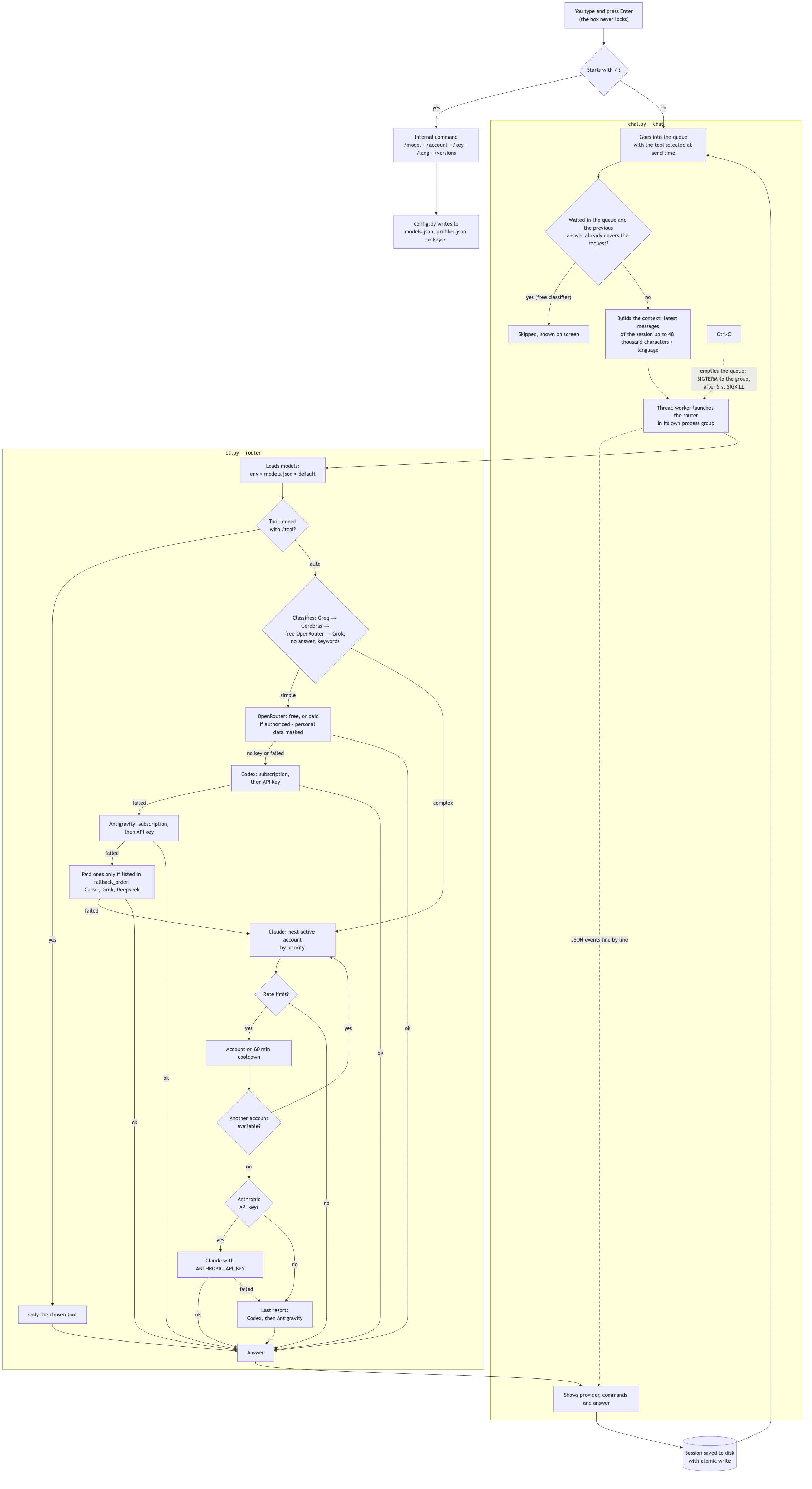
Three details the diagram makes explicit:
- Each Claude account has its own login folder. Extra accounts run with
CLAUDE_CONFIG_DIRpointing to~/.claude-accounts/<nome>. The main account is never logged out, and no credential is copied from one place to another. The exception is legacy profiles withcredentials_file, which swap the credentials file during a call. Copying.credentials.jsondoes not work reliably on macOS, where the login lives in the Keychain. - Ctrl-C kills the whole tree. The router runs in its own process group, so
canceling also ends the
claude,codexoragyrunning underneath, instead of leaving orphan processes burning quota. - The queue blocks nothing. Above the box you see the running request, the elapsed
time and the next ones in line. A request that waited goes through a free classifier
before running: if the previous answer already covers it, it is skipped. Commands and
skills always run. Ctrl-C with the queue active cancels everything without leaving the chat. If you
close the chat with requests in line, they stay saved in the session and
ai --resume IDoffers to run them. - Each answer shows what it cost. At the end of each request you see the tokens and,
when the tool reports it (OpenRouter, Grok, Claude on an API key), the cost in dollars.
/usageadds up the day's spend per tool. - You see why a tool was picked. In
automode, one short line says whether the request was treated as a coding task or a simple question and who labelled it (Groq, Cerebras, OpenRouter, Grok or the keywords). - Only the answer goes into the history. Status and diagnostic lines appear on screen, but are not sent as context with the next question. The models' internal reasoning is also discarded.
This text comes from the project README. See the original on GitHub